
Helping you to select an antivirus for Windows PC. An antivirus is quite necessary to be installed on a Windows PC from the security point of view. Only the best antivirus can provide the full-proof security to your computer from the viruses, spyware, hackers, and intruders. Technical market around the globe is filled with numerous antivirus applications. Which one to select and which one to leave? If you are also looking for the answer of this question then you’ve landed up at the right place. Here we will discuss the considerable points to help you in selecting an antivirus.

Do you have an antivirus already
Almost each OEM desktop, laptop, and motherboard for assembled computers is provided with a trial version of antivirus. In addition, few Internet Service Providers are offering free premium antivirus with their plans. Enquire first with your computer manufacturer and ISP whether they’ve offered you a free antivirus or not. If yes then get it installed in your computer. We’ve seen some companies who don’t offer an antivirus but on request, they install the free antivirus programs like AVG Antivirus, Avira Antivir etc.
Computer Configuration
What is the hardware configuration of your computer? Which Windows do you use? Search for an antivirus compatible with your Windows edition and hardware configuration. You can check the System Requirement for the selected antivirus programs. Noteworthy that you can also take help of Online PC Support to know what is the best suitable antivirus as per your computer configuration.
Nature of usage
Analyze the usage of your computer before searching for an antivirus. There is a different kind of solution for a heavy Internet surfer, casual user, professional user, business work, and corporate environment. Find out the answer of following questions:
1. Do you use your computer for fun and entertainment only? Then you need a casual protection only.
2. Do you browse the World Wide Web occasionally or stays connected with it always? Then you need an antivirus to offer real time URL check and Website security advisor.
3. Are you addicted to heavily use the social networking Websites like Facebook, Twitter, Google+, MySpace etc.? Then you need a Privacy protector for keeping your personal information secure.
4. Do your kids often use the computer? Then you need Parental Control to disallow them from visiting unsecured and porn Websites.
5. Do you need the antivirus for your smartphone also? Then go for an antivirus which offers free smartphone antivirus with the desktop one.
6. Do you often transfer the files from external devices, removable drives and discs? Then go for an antivirus with real-time protection during file transfer.
Budget Range
First decide how much you want to spend for antivirus protection. Visit the Website of the selected antivirus directly instead of rooming in the electronic showrooms or third-party online stores. Check the price of selected antivirus and list them with their features. Confused with the different prices & features and need an expert assistance between the options then go for online PC support.
Features
List the features you need in the antivirus. Few common features are
• Real time protection
• Automatic updates
• Firewall
• Spam filter
• Browser Protection
• Parental Control
• Antispyware
• Privacy Protector
• Online backup
• Computer Restore
If you cannot decide what all you need in an antivirus then contact tech support online for expert advice.
Free Options
If you do not have enough budget to purchase an antivirus then go for trusted free antivirus like Microsoft Security Essential, AVG Antivirus, Avira Antivir etc. However, they do not include the advanced options including firewall and spam filter but they’re more than sufficient for basic level of protection.
Do you have an antivirus already
Almost each OEM desktop, laptop, and motherboard for assembled computers is provided with a trial version of antivirus. In addition, few Internet Service Providers are offering free premium antivirus with their plans. Enquire first with your computer manufacturer and ISP whether they’ve offered you a free antivirus or not. If yes then get it installed in your computer. We’ve seen some companies who don’t offer an antivirus but on request, they install the free antivirus programs like AVG Antivirus, Avira Antivir etc.
Computer Configuration
What is the hardware configuration of your computer? Which Windows do you use? Search for an antivirus compatible with your Windows edition and hardware configuration. You can check the System Requirement for the selected antivirus programs. Noteworthy that you can also take help of Online PC Support to know what is the best suitable antivirus as per your computer configuration.
Nature of usage
Analyze the usage of your computer before searching for an antivirus. There is a different kind of solution for a heavy Internet surfer, casual user, professional user, business work, and corporate environment. Find out the answer of following questions:
1. Do you use your computer for fun and entertainment only? Then you need a casual protection only.
2. Do you browse the World Wide Web occasionally or stays connected with it always? Then you need an antivirus to offer real time URL check and Website security advisor.
3. Are you addicted to heavily use the social networking Websites like Facebook, Twitter, Google+, MySpace etc.? Then you need a Privacy protector for keeping your personal information secure.
4. Do your kids often use the computer? Then you need Parental Control to disallow them from visiting unsecured and porn Websites.
5. Do you need the antivirus for your smartphone also? Then go for an antivirus which offers free smartphone antivirus with the desktop one.
6. Do you often transfer the files from external devices, removable drives and discs? Then go for an antivirus with real-time protection during file transfer.
Budget Range
First decide how much you want to spend for antivirus protection. Visit the Website of the selected antivirus directly instead of rooming in the electronic showrooms or third-party online stores. Check the price of selected antivirus and list them with their features. Confused with the different prices & features and need an expert assistance between the options then go for online PC support.
Features
List the features you need in the antivirus. Few common features are
• Real time protection
• Automatic updates
• Firewall
• Spam filter
• Browser Protection
• Parental Control
• Antispyware
• Privacy Protector
• Online backup
• Computer Restore
If you cannot decide what all you need in an antivirus then contact tech support online for expert advice.
Free Options
If you do not have enough budget to purchase an antivirus then go for trusted free antivirus like Microsoft Security Essential, AVG Antivirus, Avira Antivir etc. However, they do not include the advanced options including firewall and spam filter but they’re more than sufficient for basic level of protection.
How to keep your computer safe from virus threats. Microsoft Windows is the most used Operating System on this earth. As millions are using it for their work, profession, entertainment and home use; the black collar persons like hackers mostly target Windows OS and create viruses for its destruction. Almost 99% of the viruses are made to infect the Windows computer only. If you are online at Internet or transferring the data from external sources, then your Windows PC is prone to get the virus infections. Viruses can cause the permanent loss of data and even crash your computer. So, is there any way to keep your computer safe? Yes there are few options to be considered for keeping your computer safe. Let us have a look on these tips.
Protection first
Almost each OEM Windows PC comes pre-installed with trial or full version antivirus. Also, the driver disc of almost every motherboard contains a trial antivirus. This is because you can have trusted protection layer for your valuable computer. You should install a full version and trusted antivirus such as Norton, Symantec, McAfee, Panda, Kaspersky, Trend Micro etc. If you could not afford its cost then go for a free antivirus like Avira Antivir, AVG Antivirus, and Microsoft Security Essential.
We suggest you to go for an antivirus that can offer real-time protection, automatic virus definition update, incoming & outgoing email scan, spam filter, parental control, real-time URL check, scheduled automatic scans etc.
AntiSpyware
Today, a virus doesn’t come alone in the computer. It arrives with its neighborhood companions including Trojan horses, worm, spyware, malware, adware etc. These can even block the installed antivirus, Windows Firewall, and other programs without notifying the user. In such situations, you can use an antispyware to scan the computer and to remove such harmful elements. Few trusted antispyware are Spybot S&D, MalwareBytes, Windows Defender, SUPERAntiSpyware, etc.
Thinking exactly which antivirus and antispyware you should use, then contact antivirus support service provider.
Scan the files before usage
Do you often transfer the files from external devices, removable drives, or optical discs in the computer? Then, it is better to scan these external media before transferring the files even if your antivirus offers real-time protection during file transfer.
Be Genuine
The pirated applications and non-genuine Windows are completely insecure as they are open for hackers, spyware and intruders. Therefore, it is better to use free open-source software and operating system instead of the pirated version of your favorite program.
Stay up-to-date
Set the Windows, Antivirus, Firewall, AntiSpyware, Web browser, and other software to automatically receive the updates from their respective companies. You can also manually update them from time to time. The updates will help you to keep ahead of the latest threats scattering around the globe on World Wide Web. If you are facing problem in updating these software and Windows, then take help of tech support online immediately to fix it up.
Do not
Tech Support
Purchase a subscription of Online Virus Removal from a trusted vendor. Make sure this support is available 24*7 and offer good resolution rate. This will make sure to have an expert assistance at your disposal at any point of time without any delay to fix any kind of Windows problems including viruses.

Protection first
Almost each OEM Windows PC comes pre-installed with trial or full version antivirus. Also, the driver disc of almost every motherboard contains a trial antivirus. This is because you can have trusted protection layer for your valuable computer. You should install a full version and trusted antivirus such as Norton, Symantec, McAfee, Panda, Kaspersky, Trend Micro etc. If you could not afford its cost then go for a free antivirus like Avira Antivir, AVG Antivirus, and Microsoft Security Essential.
We suggest you to go for an antivirus that can offer real-time protection, automatic virus definition update, incoming & outgoing email scan, spam filter, parental control, real-time URL check, scheduled automatic scans etc.
AntiSpyware
Today, a virus doesn’t come alone in the computer. It arrives with its neighborhood companions including Trojan horses, worm, spyware, malware, adware etc. These can even block the installed antivirus, Windows Firewall, and other programs without notifying the user. In such situations, you can use an antispyware to scan the computer and to remove such harmful elements. Few trusted antispyware are Spybot S&D, MalwareBytes, Windows Defender, SUPERAntiSpyware, etc.
Thinking exactly which antivirus and antispyware you should use, then contact antivirus support service provider.
Scan the files before usage
Do you often transfer the files from external devices, removable drives, or optical discs in the computer? Then, it is better to scan these external media before transferring the files even if your antivirus offers real-time protection during file transfer.
Be Genuine
The pirated applications and non-genuine Windows are completely insecure as they are open for hackers, spyware and intruders. Therefore, it is better to use free open-source software and operating system instead of the pirated version of your favorite program.
Stay up-to-date
Set the Windows, Antivirus, Firewall, AntiSpyware, Web browser, and other software to automatically receive the updates from their respective companies. You can also manually update them from time to time. The updates will help you to keep ahead of the latest threats scattering around the globe on World Wide Web. If you are facing problem in updating these software and Windows, then take help of tech support online immediately to fix it up.
Do not
- set the attachments to open automatically. Always open the attachments manually.
- open the emails arrived from unknown sources.
- open the email until you clearly understand the sender’s address. A phishing email has trusted brand names like ‘COCA COLA’ or ‘WHITE HOUSE’ but sender’s email address may not be trustworthy.
- boot the computer from unknown disc or removable drive.
- download unknown or malicious software from the Web even if it seems to be a prize.
Tech Support
Purchase a subscription of Online Virus Removal from a trusted vendor. Make sure this support is available 24*7 and offer good resolution rate. This will make sure to have an expert assistance at your disposal at any point of time without any delay to fix any kind of Windows problems including viruses.
Important Points to consider while selecting a printer. A printer is a costlier device and mostly cannot be returned back if you do not like it. You must consider all the aspects before purchasing a printer. If you are going to buy a printer for your office or home, then you’ve landed up the right place. Here we will discuss the most important tips to consider while purchasing a printer. These will help you to make an effective decision. Let us have a look upon them.
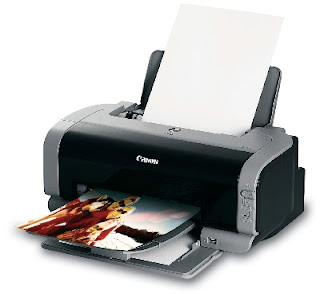
Features Required
List all the features you need with your new printer. Do you just want to print the black or colorful text? Do you also need it to print the images? If you need a printer for both images and text then inkjet printer is the best choice, whereas black-ink laser printer can be considered for printing text only.
Type of Machine
Do you only need a printer to print the pages or do you think to go for a multifunction device? If Multifunction device then what all you want with it – scanner, copier, fax, printer or a telephone. Do you need a laser multifunction device or an inkjet multifunction printer? You can take help of online computer tech support in case of any confusion while deciding the right printer.
Purpose
Do you need a printer for home usage or official work? Most of the offices go for a multifunction device instead of dedicated printer. You can also consider buying an online computer support to have real-time support for the printer’s software and driver problem. This will help you to keep your printer working without any downtime.
Budget
What is the specified budget range to purchase the printer? List all the selected printers with their price and feature list. Yes, one can increase the budget a bit to have some more features.
Connectivity Options
Do you need a printer for only one computer or for a local area network established in your home or office? Almost each latest printer offers the connectivity through USB 2.0 or 3.0. The network connectivity options include Ethernet cable and WiFi connection. Please check which type of connectivity option you need with the printer.
Printing Cost
Does printing cost matters for you? Check out the per page printing cost for the selected printer. You can also check how much the original cartridge cost and how much you’ve to pay for a refill. Do you get the optimum quality with a refill or manufacturer wants to have original cartridges only?
Support & Warranty
The printer manufacturer, by default, offers one year standard warranty and free service on their products. You should check what all has been covered in the provided free support and warranty. Read their manuals carefully before making any decision. We suggest you to go for an online computer support for better coverage of your printer and computer.
Conclusion
You should consider the required features, type of machine, its purpose, budget range, connectivity options, and printing cost while purchasing a new printer.

Features Required
List all the features you need with your new printer. Do you just want to print the black or colorful text? Do you also need it to print the images? If you need a printer for both images and text then inkjet printer is the best choice, whereas black-ink laser printer can be considered for printing text only.
Type of Machine
Do you only need a printer to print the pages or do you think to go for a multifunction device? If Multifunction device then what all you want with it – scanner, copier, fax, printer or a telephone. Do you need a laser multifunction device or an inkjet multifunction printer? You can take help of online computer tech support in case of any confusion while deciding the right printer.
Purpose
Do you need a printer for home usage or official work? Most of the offices go for a multifunction device instead of dedicated printer. You can also consider buying an online computer support to have real-time support for the printer’s software and driver problem. This will help you to keep your printer working without any downtime.
Budget
What is the specified budget range to purchase the printer? List all the selected printers with their price and feature list. Yes, one can increase the budget a bit to have some more features.
Connectivity Options
Do you need a printer for only one computer or for a local area network established in your home or office? Almost each latest printer offers the connectivity through USB 2.0 or 3.0. The network connectivity options include Ethernet cable and WiFi connection. Please check which type of connectivity option you need with the printer.
Printing Cost
Does printing cost matters for you? Check out the per page printing cost for the selected printer. You can also check how much the original cartridge cost and how much you’ve to pay for a refill. Do you get the optimum quality with a refill or manufacturer wants to have original cartridges only?
Support & Warranty
The printer manufacturer, by default, offers one year standard warranty and free service on their products. You should check what all has been covered in the provided free support and warranty. Read their manuals carefully before making any decision. We suggest you to go for an online computer support for better coverage of your printer and computer.
Conclusion
You should consider the required features, type of machine, its purpose, budget range, connectivity options, and printing cost while purchasing a new printer.
Asus presents the series AIO PC products (All In One PC) to meet the needs of people who want a compact PC product in the space you are using the touch screen feature. Products with the touch screen feature appreciated by the public because of the use of flexible, from Mobile Phone / Smartphone, Tablet and PC.
Let's look at reviews and full specs Asus ET2700INTS below.
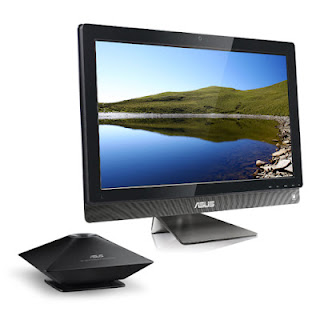
ET2700INTS Asus AIO PC using a 27-inch screen (touchscreen) and a resolution of 1920x1080 Full HD. Size was determined to be used to play games, watch full HD movies and browsing. The resulting sound when watching movies or listening to music is very good, with additional external Sub Woofer wrapped with black matte and flat shape,Screen Touchscreen on ET2700INTS make you comfortable when using for playing casual games and browsing.
Dimension ET2700INTS Asus AIO PC is quite big, but the size of it because of the screen size 27 inches and the thickness is fairly balanced. How to install Asus ET2700INTS is easy, open the box and pull out and then plug the adapter cord that comes and do not need to install anything else. This product will not waste space on your premises and also equipped with sturdy legs.
Asus Series AIO series is unlike any other, because it uses high specification, making this product as a 3D gaming engine is powerful, and capable multimedia machine.
Asus ET2700INTS premium features is the presence of an assortment of ports and other equipment are embedded at various places (Rear, right, left). Optical Drive Blu-Ray and USB 3.0 port, D-Sub, HDMI is also available diperangkat.
Series AIO looks neat with the placement of the port side section quite well with support cover.
The sales package Asus ET2700INTS given: Wireless Mouse, Keyboard. Mouse provided a medium-sized, if your hands are large, we feel uncomfortable and need to buy a bigger mouse. The keyboard is comfortable to use and is provided with a form on the chicklet keys. And also provide the Windows Media Player.
Asus sound ET2700INTS feels very good when you use the music plays. and be able to play 3D games run smoothly with certain resolutions and settings.
Performance
The performance offered by the Asus ET2700INTS able to run applications smoothly onto the middle class and the processor used is not the mobile version.
Electric power consumption
Users do not have to worry about electricity bills swell, because the device is very economical. And users can prove yourself with regular Desktop PC today.
Performance NVIDIA Ge Force GT450
NVIDIA GeForce GT450 performance results are very nice, being able to run a variety of 3D games at certain resolutions and high settings. Such as:
- Left4 game series Dead and Resident Evil 5 was able to walk smoothly on FPS numbers 30 and above with high settings and a resolution of full HD.
- Series game DiRT2 able to run smoothly, but the lower resolution of 1 dipengaturan hrus. If not done, then the 30 FPS rate can not be achieved.
Transcoding Asus ET2700INTS running quickly using CUDA, for Quick Sync feature is not found. Possible lack of Quick Sync feature for not using NVIDIA Optimus.
Final Conclusion
Asus ET2700INTS provide an alternative solution for PC users with limited space, but high performance and has a large screen. And being able to run a top-class applications.
Various jobs you can run with a AIO series from Asus, and fun entertainment for you. Because the variety of 3D games can run, Full HD movie quality, and a good sound system is supported with an additional subwoofer good quality. AIO series is also economical electrical power, so no need to worry about the cost of electricity to swell.
Appraisal
+ High specification
+ Touch Screen, Big Screen, Full HD
+ Low power consumption
+ Blue-Ray
- Large Adaptor
Specs Asus ET2700INTS AIO PC
Let's look at reviews and full specs Asus ET2700INTS below.

ET2700INTS Asus AIO PC using a 27-inch screen (touchscreen) and a resolution of 1920x1080 Full HD. Size was determined to be used to play games, watch full HD movies and browsing. The resulting sound when watching movies or listening to music is very good, with additional external Sub Woofer wrapped with black matte and flat shape,Screen Touchscreen on ET2700INTS make you comfortable when using for playing casual games and browsing.
Dimension ET2700INTS Asus AIO PC is quite big, but the size of it because of the screen size 27 inches and the thickness is fairly balanced. How to install Asus ET2700INTS is easy, open the box and pull out and then plug the adapter cord that comes and do not need to install anything else. This product will not waste space on your premises and also equipped with sturdy legs.
Asus Series AIO series is unlike any other, because it uses high specification, making this product as a 3D gaming engine is powerful, and capable multimedia machine.
Asus ET2700INTS premium features is the presence of an assortment of ports and other equipment are embedded at various places (Rear, right, left). Optical Drive Blu-Ray and USB 3.0 port, D-Sub, HDMI is also available diperangkat.
Series AIO looks neat with the placement of the port side section quite well with support cover.
The sales package Asus ET2700INTS given: Wireless Mouse, Keyboard. Mouse provided a medium-sized, if your hands are large, we feel uncomfortable and need to buy a bigger mouse. The keyboard is comfortable to use and is provided with a form on the chicklet keys. And also provide the Windows Media Player.
Asus sound ET2700INTS feels very good when you use the music plays. and be able to play 3D games run smoothly with certain resolutions and settings.
Performance
The performance offered by the Asus ET2700INTS able to run applications smoothly onto the middle class and the processor used is not the mobile version.
Electric power consumption
Users do not have to worry about electricity bills swell, because the device is very economical. And users can prove yourself with regular Desktop PC today.
Performance NVIDIA Ge Force GT450
NVIDIA GeForce GT450 performance results are very nice, being able to run a variety of 3D games at certain resolutions and high settings. Such as:
- Left4 game series Dead and Resident Evil 5 was able to walk smoothly on FPS numbers 30 and above with high settings and a resolution of full HD.
- Series game DiRT2 able to run smoothly, but the lower resolution of 1 dipengaturan hrus. If not done, then the 30 FPS rate can not be achieved.
Transcoding Asus ET2700INTS running quickly using CUDA, for Quick Sync feature is not found. Possible lack of Quick Sync feature for not using NVIDIA Optimus.
Final Conclusion
Asus ET2700INTS provide an alternative solution for PC users with limited space, but high performance and has a large screen. And being able to run a top-class applications.
Various jobs you can run with a AIO series from Asus, and fun entertainment for you. Because the variety of 3D games can run, Full HD movie quality, and a good sound system is supported with an additional subwoofer good quality. AIO series is also economical electrical power, so no need to worry about the cost of electricity to swell.
Appraisal
+ High specification
+ Touch Screen, Big Screen, Full HD
+ Low power consumption
+ Blue-Ray
- Large Adaptor
Specs Asus ET2700INTS AIO PC
- Processor: Intel Core i7 2600, Speed 3.4GHz, 8MB L3 Cache
- Operating System: Windows 7 Home Premium 64-bit
- Screen: 27 inch, 1920x1080 pixel resolution
- Graphics: NVIDIA GeForce GT540
- RAM Memory: 8GB DDR3
- Memory Hard Disk: 2TB SATA
- Connection: Bluetooth, Wi-Fi 802.11 b / g / n, USB 3.0 port, USB 2.0 ports, eSATA, HDMI Port, Antenna, Ethernet, Audio In / Out, Web Cam, Card Reader.
